Whats New in CADWorx V24: Top Updates Every Engineer Should Know
- Dec 3, 2025
- 3 min read
Updated: Dec 10, 2025
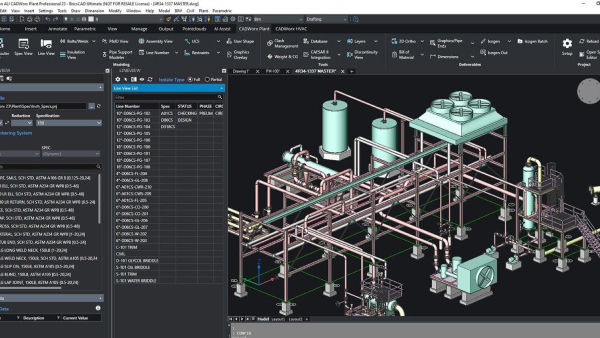
CADWorx continues to be one of the most trusted plant design software suites in the industry, helping engineers deliver accurate and efficient piping, equipment, and structural designs. If you’re wondering whats new in CADWorx V24, you’re in the right place. This latest version comes packed with enhancements that boost productivity, improve collaboration, and streamline workflows — all key factors for modern engineering projects.
In this blog, we’ll cover the top updates in CADWorx V24 that every engineer should know about, helping you get the most out of this powerful software.
What is CADWorx and Why It Matters?
CADWorx Plant Professional is a comprehensive CAD software used by plant engineers, designers, and detailers for creating 3D models of piping, equipment, and structural components. It’s widely valued for its intuitive interface, extensive component libraries, and tight integration with CAESAR II - pipe stress analysis.
The release of CADWorx V24 marks a significant step forward by introducing tools and improvements that address today’s evolving engineering challenges, including better automation, smarter collaboration, and enhanced data management.
Top Features and Updates in CADWorx V24
1. Enhanced User Interface for Improved Workflow
Simplified ribbon menus and toolbars help users quickly find commands
Customizable workspace allows personalized layouts
Improved graphics performance for smoother navigation and modeling
The cleaner and more responsive UI makes daily tasks faster and less error-prone, especially for large complex models.
2. Advanced Piping Design Enhancements
Expanded piping component libraries with new fittings and materials
More accurate routing algorithms reduce manual adjustments
Automatic clash detection during modeling to prevent errors early
These enhancements save time and increase accuracy when developing piping layouts for complex plants.
3. Smarter Equipment Modeling
New tools to import and manipulate manufacturer equipment data
Enhanced support for nozzle orientation and connection validation
Improved parametric equipment templates for faster custom design
This helps engineers model equipment more precisely and quickly, reducing rework and improving integration.
4. Collaboration and Data Management Upgrades
Better integration with cloud storage solutions for secure file sharing
Support for Industry Foundation Classes (IFC) improves interoperability
Enhanced version control ensures team members work on the latest designs
These features foster better teamwork and reduce costly coordination errors on projects.
5. Automated Drawing and Isometric Generation
Faster generation of detailed isometric drawings with improved annotation
Customizable drawing templates adapt to company standards easily
Integration with revision management tools for smoother document control
Automation in documentation significantly cuts project turnaround times and boosts consistency.
6. Improved Support for Structural Steel Modeling
New structural connections and braces added to the library
Advanced tools for base plate and foundation design
Enhanced integration between piping and structural models
This lets multidisciplinary teams work seamlessly, reducing clashes between piping and structure.
Why These Updates Matter to Engineers
Engineers face increasing project complexity, tighter schedules, and demand for higher quality.
The updates in CADWorx V24 directly address these pain points by:
Increasing design speed with automation and better modeling tools
Reducing errors with built-in clash detection and validation
Enhancing collaboration with cloud support and version control
Supporting multidisciplinary coordination through improved structural modeling
By adopting the latest version, engineering teams can work more efficiently, deliver accurate designs, and minimize costly revisions.
How to Make the Most of CADWorx V24
To maximize the benefits of the new features, consider these practical tips:
Training and Onboarding: Invest in updated training sessions to get your team familiar with the new interface and tools.
Update Company Templates: Customize drawing templates and component libraries to align with updated standards.
Leverage Cloud Integration: Use the new cloud collaboration features to keep design data accessible and secure.
Coordinate Closely: Take advantage of improved structural integration for early clash detection between disciplines.
Regular Software Updates: Keep CADWorx updated to receive patches and minor improvements released after V24.
What Users Are Saying About CADWorx V24
Early adopters praise the improved UI and faster isometric generation. Many highlight the benefits of enhanced clash detection, which prevents design conflicts before fabrication begins. The better collaboration tools are also welcomed by teams working remotely or across multiple offices.
Final Thoughts
Knowing whats new in CADWorx V24 equips engineers and designers with the knowledge to take full advantage of its powerful capabilities. From a smoother user interface to advanced piping, equipment, and structural tools, V24 is designed to boost productivity and design quality in today’s demanding plant projects.
By embracing these updates, engineering teams can ensure they stay competitive, reduce errors, and deliver projects on time and budget.


Comments